Thursday, March 13, 2014

A Chess Project, Part 8

Intro

We're moving right along with this sizable project, a Web API that will tell you the "best" move to make for a given chess position/game. We've created a test page, a Web API for clients to call, and we're still in the middle of calculating valid moves. If you need a refresher, look back through the history of this blog and find parts 1-7; they'll give you the info you need. On to part 8!

Can't Put Your Own King in Check

As I mentioned last week, there is still one major restriction we need to code: you cannot make a move that puts your own king in check. Here is an illustration of such an illegal move:

(white's turn)


Normally the white pawn at d2 (the one with the red arrow pointing at it) could move forward/up one square to d3, or two squares to d4. However, because the black bishop on b4 would threaten the king if the pawn moved out of the way, the pawn cannot in fact move from its current location. This is the type of move we are trying to prevent, so let's figure out how to do that.

Logically speaking, the best thing I can come up with is to pretend that the white piece has moved, and then check the valid moves of all the black pieces. If a black piece would be capable of "taking" the white king, then the previous move was invalid. Keep in mind that this invalidity could count for any type of piece; a pawn move can't put your king in danger, a rook move can't, and so on. This means a logical place to put the code would be in AddMoveToList, as it's already called every single time we add a move to, well, the list.

This isn't where we'll start though. We'll first create a method that tells us if the king is in check. We'll be creative and call it IsKingInCheck. Here's the code for it:

        protected bool IsKingInCheck(bool colorIsWhite, ChessBoard board)
        {
            var kingPosition = FindKing(colorIsWhite, board);
            return ColorThreatensSquare(!colorIsWhite, board, kingPosition.Item1, kingPosition.Item2);
        }


Pretty short and sweet; we find the king, and then return a boolean telling us if the opposite color threatens the square that the king is on. We haven't yet created the FindKing function though, so let's do that now:

        protected Tuple<short, short> FindKing(bool colorIsWhite, ChessBoard board)
        {
            short kingPieceValue = (short)(Constants.King * (colorIsWhite ? Constants.WhiteTransform : Constants.BlackTransform));
            for (short row = 0; row < 8; row++)
            {
                for (short col = 0; col < 8; col++)
                {
                    if (board.Board[row, col] == kingPieceValue)
                        return new Tuple<short, short>(row, col);
                }
            }
            throw new Exception("King not found");
        }


This method determines what the short constant value is for the king based on the color we are looking for, then loops through the board to find the king on it. If there is no king we throw an exception.

It's worth pointing out now that we only need to traverse 1 branch into the tree to check for checks; after all, when you're checking if a piece threatens the king, you don't really care if the piece can actually make the move; you only care if the square is threatened. Because of this we now need to create a new field of class ChessValidMoveCalculator that tells us whether we should allow multi-layer traversal of the tree:

protected bool m_allowCheckSubTrees = true;


If you'll recall, IsKingInCheck calls the pre-existing function ColorThreatensSquare. It is in this function that we calculate the next color's valid moves to see if a square is threatened, so it's in this method that we need to set m_allowCheckSubTrees to false. Here's the updated version of this function:

        public bool ColorThreatensSquare(bool colorIsWhite, ChessBoard board, short row, short col)
        {
            var game = new ChessGame();
            var positions = new List<ChessBoard>();
            positions.Add(new ChessBoard(true) { Board = (short[,])board.Board.Clone() });
            game.Positions = positions.ToList();
            game.GameStatus = colorIsWhite ? GameStatus.WhitesTurn : GameStatus.BlacksTurn;
            var futureCalculator = new ChessValidMoveCalculator(game);
            futureCalculator.m_allowCheckSubTrees = false;
            var futurePositions = futureCalculator.CalculateValidMoves();
            var colorSign = colorIsWhite ? Constants.WhiteTransform : Constants.BlackTransform;
            foreach (var position in futurePositions)
                if (Math.Sign(position.Board[row, col]) == colorSign)
                    return true;
            return false;
        }


What did we do to this method? We first set the game.GameStatus to the turn of the appropriate color, based on who we are checking using the parameter colorIsWhite. I realized when I opened up this unit that I had never set whose turn it is in this "future" game, so I needed to do that in order to keep things from splodin. I then set futureCalculator.m_allowCheckSubTrees to false, so that we don't check to make sure the piece can actually move to determine if it threatens a square, as we don't want a nigh-infinite traversal of our logic tree.

The last thing we need to do is call our new method IsKingInCheck. As I said a few paragraphs ago, the best place to do this is in AddMoveToList.

        protected IList<ChessBoard> AddMoveToList(ChessBoard startingBoard, IList<ChessBoard> boards, short oldRow, short oldCol, short newRow, short newCol)
        {
            var resultArray = new ChessBoard[boards.Count];
            boards.CopyTo(resultArray, 0);
            var result = resultArray.ToList();
            if (newRow >= 0 && newRow < 8 && newCol >= 0 && newCol < 8)
            {
                //check the sign (color) of the current square and future square; if same, don't allow the move
                var startingPieceSign = Math.Sign(startingBoard.Board[oldRow, oldCol]);
                var futurePieceSign = Math.Sign(startingBoard.Board[newRow, newCol]);
                if (startingPieceSign != futurePieceSign)
                {
                    var futureBoard = (short[,])startingBoard.Board.Clone();
                    var piece = futureBoard[oldRow, oldCol];
                    futureBoard[oldRow, oldCol] = Constants.Empty;
                    futureBoard[newRow, newCol] = piece;
                    var newBoard = new ChessBoard(true);
                    newBoard.Board = futureBoard;
                    //check if new board and starting board are the same; if so don't add to valid moves list
                    var equal = futureBoard.Rank == startingBoard.Board.Rank &&
                        Enumerable.Range(0, futureBoard.Rank).All(dimension => futureBoard.GetLength(dimension) == startingBoard.Board.GetLength(dimension)) &&
                        futureBoard.Cast<short>().SequenceEqual(startingBoard.Board.Cast<short>());
                    //make sure the move wouldn't put the current color's king in check
                    var wouldPutSameColorKingInCheck = false;
                    if (m_allowCheckSubTrees)
                    {
                        var futureBoardContainer = new ChessBoard(true);
                        futureBoardContainer.Board = futureBoard;
                        wouldPutSameColorKingInCheck = IsKingInCheck(m_game.GameStatus == GameStatus.BlacksTurn, futureBoardContainer);
                    }
                    //add move to list of valid moves
                    if (!equal && !wouldPutSameColorKingInCheck)
                        result.Add(newBoard);
                }
            }
            return result;
        }


The addition to this function starts with the comment "make sure the move wouldn't put the current color's king in check". Here we first determine if we're supposed to check sub-trees, because if not then we don't care if the move would put the king in check. If we are allowed to check sub-trees we set a local variable wouldPutSameColorKingInCheck to the appropriate value by calling IsKingInCheck, passing in the potential future board. Lastly we add the move to our list of valid moves only if it would not put the king in check.

What's Next?

We're moving right along. Next week we'll create our unit tests. We won't make any actual progress on the "best" move calculation while creating our tests, but we'll give ourselves better confidence that what we've done so far is actually correct and most likely we'll be able to find and fix some bugs.

Here's the link to the current source code.

Resources

  • Online chess board editor "Apronus"

Thursday, March 6, 2014

A Chess Project, Part 7

Intro

Here we are in part 7 of the chess project. Last week we coded most of the valid moves available to our chess pieces. This week we'll tackle the remainder. What's left? En passant pawn captures and castling.


En Passant

I'm going to try not to plagiarize here, but I'm sure quite a bit has been written about en-passant so if you recognize these words, sorry. An en-passant capture is a pawn move where it captures an enemy pawn that has just moved two squares forward, pretending the target pawn has moved only a single square forward. The capturer must be on it's color's 5th rank. It's kind of hard to picture so let me refer you to this Wikipedia article which has some nice pictures.

Open up ChessValidMoveCalculator. Skip down to CalculatePawnValidMoves, as this is where we'll be doing our work. We already have calculations in there for moving forward-left and forward-right, and an en passant capture is a special case of these 2 moves. I won't bore you with too much detail, nor will I claim that this code is 100% perfect (darn my lack of unit testing!). Below you will see the modified portion ChessValidMoveCalculator.

                //forward-left diagonal (only if capturing opponent's piece)
                rowMovementAmount = (short)(1 * rowModifier);
                newRow = (short)(currentRow + rowMovementAmount);
                newCol = (short)(currentCol - 1);
                if (newRow >= 0 && newRow <= 7 && newCol >= 0 && newCol <= 7)
                {
                    if (Math.Sign(m_game.Positions.Last().Board[newRow, newCol]) == -Math.Sign(m_game.Positions.Last().Board[currentRow, currentCol]))
                    {
                        if (newRow == 0 || newRow == 7) //back rank promotions
                        {
                            for (short promotionPieceIndex = Constants.Knight; promotionPieceIndex <= Constants.Queen; promotionPieceIndex++)
                            {
                                short promotionPiece = (short)(promotionPieceIndex * rowModifier);
                                boards = AddMoveToList(m_game.Positions.Last(), boards, currentRow, currentCol, newRow, newCol);
                            }
                        }
                        else
                            boards = AddMoveToList(m_game.Positions.Last(), boards, currentRow, currentCol, newRow, newCol);
                    }
                    else if (m_game.Positions.Count() > 1) //big chunk of logic to see if en passant is possible
                    {
                        if ((currentRow == 3 && currentStatus == GameStatus.WhitesTurn) || (currentRow == 4 && currentStatus == GameStatus.BlacksTurn))
                        {
                            var priorPosition = m_game.Positions.ToArray()[m_game.Positions.Count() - 1].Board;
                            //pawn of opposite color moved up 2 squares next to the current piece
                            if (priorPosition[newRow + rowModifier, newCol] == Constants.Pawn * rowModifier && m_game.Positions.Last().Board[currentRow, newCol] == Constants.Pawn * rowModifier) 
                            {
                                boards = AddMoveToList(m_game.Positions.Last(), boards, currentRow, currentCol, newRow, newCol);
                            }
                        }
                    }
                }
                //forward-right diagonal (only if capturing opponent's piece)
                rowMovementAmount = (short)(1 * rowModifier);
                newRow = (short)(currentRow + rowMovementAmount);
                newCol = (short)(currentCol + 1);
                if (newRow >= 0 && newRow <= 7 && newCol >= 0 && newCol <= 7)
                {
                    if (Math.Sign(m_game.Positions.Last().Board[newRow, newCol]) == -Math.Sign(m_game.Positions.Last().Board[currentRow, currentCol]))
                    {
                        if (newRow == 0 || newRow == 7) //back rank promotions
                        {
                            for (short promotionPieceIndex = Constants.Knight; promotionPieceIndex <= Constants.Queen; promotionPieceIndex++)
                            {
                                short promotionPiece = (short)(promotionPieceIndex * rowModifier);
                                boards = AddMoveToList(m_game.Positions.Last(), boards, currentRow, currentCol, newRow, newCol);
                            }
                        }
                        else
                            boards = AddMoveToList(m_game.Positions.Last(), boards, currentRow, currentCol, newRow, newCol);
                    }
                    else if (m_game.Positions.Count() > 1) //big chunk of logic to see if en passant is possible
                    {
                        if ((currentRow == 3 && currentStatus == GameStatus.WhitesTurn) || (currentRow == 4 && currentStatus == GameStatus.BlacksTurn))
                        {
                            var priorPosition = m_game.Positions.ToArray()[m_game.Positions.Count() - 1].Board;
                            //pawn of opposite color moved up 2 squares next to the current piece
                            if (priorPosition[newRow + rowModifier, newCol] == Constants.Pawn * rowModifier && m_game.Positions.Last().Board[currentRow, newCol] == Constants.Pawn * rowModifier)
                            {
                                boards = AddMoveToList(m_game.Positions.Last(), boards, currentRow, currentCol, newRow, newCol);
                            }
                        }
                    }
                }


There are 2 additions, and both are else chunks that have a comment with "en passant" in it. If the current piece is a pawn, and the pawn is on the 5th rank for it's appropriate color, and if the prior move saw a pawn move 2 squares to get next to the current pawn, then en passant is available.


Castling

Castling is an important defensive maneuver in chess whereby the king gets to move 2 squares towards the edge of the board and the rook to that same side jumps 1 square to the opposite side of the king. In the early part of the game this has 2 important purposes: the first part is this gets the king nestled into the easily-defensible corner, usually behind a shield of protective pawns. This gives the king disposable cover that is tough to break through cheaply. The second purpose is it brings the rook closer into play. Rooks are more valuable in the center of the board where they have more room to roam.

 The king can castle in either direction (left and right), but with these limitations:
  1. there can be no other pieces between the king and the rook.
  2. the king and rook must still be on their starting square (they cannot have moved yet during the game).
  3. None of the opponents pieces may threaten squares that the king has to move through, to, or from.
  4. And of course you can't make any move that puts your king in check, including castling.

As you've guessed, the logic for this maneuver will go into the method CalculateKingValidMoves. As you can see below, I've split the castling logic out into 2 sections: 1 for black and 1 for white. It just looks a little cleaner this way:

        protected IList<ChessBoard> CalculateKingValidMoves(short currentRow, short currentCol, IList<ChessBoard> boards, GameStatus currentStatus)
        {
            short newRow;
            short newCol;
            short rowMovementAmount;
            short colMovementAmount;
            bool isWhitePiece = m_game.Positions.Last().Board[currentRow, currentCol] > 0;
            bool isBlackPiece = m_game.Positions.Last().Board[currentRow, currentCol] < 0;
            if ((currentStatus == GameStatus.BlacksTurn && isBlackPiece) || (currentStatus == GameStatus.WhitesTurn && isWhitePiece))
            {
                //+1+1,+1-1,-1+1,-1-1
                for (rowMovementAmount = -1; rowMovementAmount <= 1; rowMovementAmount++)
                {
                    for (colMovementAmount = -1; colMovementAmount <= 1; colMovementAmount++)
                    {
                        newRow = (short)(currentRow + rowMovementAmount);
                        newCol = (short)(currentCol + colMovementAmount);
                        boards = AddMoveToList(m_game.Positions.Last(), boards, currentRow, currentCol, newRow, newCol);
                    }
                }
                //black castle
                if (currentStatus == GameStatus.BlacksTurn && isBlackPiece && currentCol == 4 && currentRow == 0)
                {
                    //castle west
                    if (m_game.Positions.Last().Board[0, 0] == Constants.Rook * Constants.BlackTransform &&
                        m_game.Positions.Last().Board[0, 1] == Constants.Empty &&
                        m_game.Positions.Last().Board[0, 2] == Constants.Empty &&
                        m_game.Positions.Last().Board[0, 3] == Constants.Empty)
                    {
                        var futureBoard = (short[,])m_game.Positions.Last().Board.Clone();
                        futureBoard[0, 2] = Constants.King * Constants.BlackTransform;
                        futureBoard[0, 3] = Constants.Rook * Constants.BlackTransform;
                        boards = boards.ToList();
                        bool anySquareThreatened = false;
                        anySquareThreatened = anySquareThreatened || ColorThreatensSquare(true, m_game.Positions.Last(), 0, 0);
                        anySquareThreatened = anySquareThreatened || ColorThreatensSquare(true, m_game.Positions.Last(), 0, 1);
                        anySquareThreatened = anySquareThreatened || ColorThreatensSquare(true, m_game.Positions.Last(), 0, 2);
                        anySquareThreatened = anySquareThreatened || ColorThreatensSquare(true, m_game.Positions.Last(), 0, 3);
                        if (!anySquareThreatened)
                            boards.Add(new ChessBoard(true) { Board = futureBoard });
                    }
                    //castle east
                    if (m_game.Positions.Last().Board[0, 7] == Constants.Rook * Constants.BlackTransform &&
                        m_game.Positions.Last().Board[0, 6] == Constants.Empty &&
                        m_game.Positions.Last().Board[0, 5] == Constants.Empty)
                    {
                        var futureBoard = (short[,])m_game.Positions.Last().Board.Clone();
                        futureBoard[0, 6] = Constants.King * Constants.BlackTransform;
                        futureBoard[0, 5] = Constants.Rook * Constants.BlackTransform;
                        boards = boards.ToList();
                        bool anySquareThreatened = false;
                        anySquareThreatened = anySquareThreatened || ColorThreatensSquare(true, m_game.Positions.Last(), 0, 7);
                        anySquareThreatened = anySquareThreatened || ColorThreatensSquare(true, m_game.Positions.Last(), 0, 6);
                        anySquareThreatened = anySquareThreatened || ColorThreatensSquare(true, m_game.Positions.Last(), 0, 5);
                        anySquareThreatened = anySquareThreatened || ColorThreatensSquare(true, m_game.Positions.Last(), 0, 4);
                        if (!anySquareThreatened)
                            boards.Add(new ChessBoard(true) { Board = futureBoard });
                    }
                }
                //white castle
                if (currentStatus == GameStatus.WhitesTurn && isWhitePiece && currentCol == 4 && currentRow == 7)
                {
                    //castle west
                    if (m_game.Positions.Last().Board[7, 0] == Constants.Rook &&
                        m_game.Positions.Last().Board[7, 1] == Constants.Empty &&
                        m_game.Positions.Last().Board[7, 2] == Constants.Empty &&
                        m_game.Positions.Last().Board[7, 3] == Constants.Empty)
                    {
                        var futureBoard = (short[,])m_game.Positions.Last().Board.Clone();
                        futureBoard[7, 2] = Constants.King;
                        futureBoard[7, 3] = Constants.Rook;
                        boards = boards.ToList();
                        bool anySquareThreatened = false;
                        anySquareThreatened = anySquareThreatened || ColorThreatensSquare(false, m_game.Positions.Last(), 7, 0);
                        anySquareThreatened = anySquareThreatened || ColorThreatensSquare(false, m_game.Positions.Last(), 7, 1);
                        anySquareThreatened = anySquareThreatened || ColorThreatensSquare(false, m_game.Positions.Last(), 7, 2);
                        anySquareThreatened = anySquareThreatened || ColorThreatensSquare(false, m_game.Positions.Last(), 7, 3);
                        if (!anySquareThreatened)
                            boards.Add(new ChessBoard(true) { Board = futureBoard });
                    }
                    //castle east
                    if (m_game.Positions.Last().Board[7, 7] == Constants.Rook &&
                        m_game.Positions.Last().Board[7, 6] == Constants.Empty &&
                        m_game.Positions.Last().Board[7, 5] == Constants.Empty)
                    {
                        var futureBoard = (short[,])m_game.Positions.Last().Board.Clone();
                        futureBoard[7, 6] = Constants.King;
                        futureBoard[7, 5] = Constants.Rook;
                        boards = boards.ToList();
                        bool anySquareThreatened = false;
                        anySquareThreatened = anySquareThreatened || ColorThreatensSquare(false, m_game.Positions.Last(), 7, 7);
                        anySquareThreatened = anySquareThreatened || ColorThreatensSquare(false, m_game.Positions.Last(), 7, 6);
                        anySquareThreatened = anySquareThreatened || ColorThreatensSquare(false, m_game.Positions.Last(), 7, 5);
                        anySquareThreatened = anySquareThreatened || ColorThreatensSquare(false, m_game.Positions.Last(), 7, 4);
                        if (!anySquareThreatened)
                            boards.Add(new ChessBoard(true) { Board = futureBoard });
                    }
                }
            }
            return boards;
        }

It's a pretty fair amount of code here; we have to check both directions since the kings and rooks can castle both left and right. We also checked to make sure no pieces are between king and rook, and made sure no opposing pieces threaten the squares they are on or that they will be passing through.

Summary and What's Next

That's it for this week folks. This stuff is getting harder each week! The good news is that there are no more movement types left to code. The bad news is we still have one major restriction to code, and that being that you cannot make a move which puts your own king in check. We will code this one in the next blog post and apply it to all of the move calculations that we have done so far. I'm also becoming more and more wary of how complicated the code is getting; I'm not really trusting the accuracy of the code. We will need to start unit testing this stuff pretty soon, possibly even in the next post. Normally I would do the unit testing alongside the actual coding, but for the sake of keeping these posts reasonable and focused I have foregone unit testing to date.

And finally, here is the code

Resources

Castling

Thursday, February 27, 2014

A Chess Project, Part 6

Intro

Here in part 6 we won't go very in-depth into the code. There were just too many changes, so I'll post a link to the full solution at the bottom of this post for you to download and peruse at your pleasure. I'll cover some of the highlights below though so you know what's different from last week.

ChessValidMoveCalculator

A number of files have been modified to make this week possible. First and foremost, ChessValidMoveCalculator. It has been very heavily modified to include the following types of chess piece movement:
  1. basic knight moves
  2. basic bishop moves
  3. basic rook moves
  4. basic queen moves
  5. basic king moves
  6. can't move a piece on top of another piece of the same color
  7. only the person whose turn it is can move
  8. pawns can't jump over pieces
  9. knights CAN jump over pieces
  10. bishops can't jump over pieces
  11. rooks can't jump over pieces
  12. queens can't jump over pieces
  13. pawns can go 2 squares only if they start on row1 or row7
  14. pawns can move diagonal only to capture piece
And I also refactored some code and weeded out a couple bugs in this unit. Have a look, you'll see this unit is starting to look pretty close to complete (at least until we code in victory conditions).

Default.aspx and Default.aspx.cs In BlogChessApiFlexer

I modified these pages only to facilitate testing of the Web API. But hey, it's still useful!

BlogChessController (the Web API Main Unit)

I also modified this unit to facilitate testing. The method PostBestMove, which is supposed to calculate and return the best move, has now been tasked with calculating and returning the complete list of valid moves. Later on when we can evaluate boards we'll set it back to its rightful purpose, but for now it's a great way to debug the code that's currently available.

Action Shot

I kinda feel like I need to show this product in action, so here's a screenshot of it doing it's thing:

The above shows the valid moves, as calculated by our code, assuming a standard chess starting position. Recall those piece values from a couple blogs ago? 0=empty square,1=pawn,2=knight,3=bishop,4=rook,5=queen,6=king, with black pieces being the negative value. Pretty cool huh? I hope you're enjoying this project, I certainly am. Lotta work though!

What's Next?

We still haven't attempted victory conditions, so we'll still have to do those at some point. We also skipped 2 types of movement that I just didn't have time for this week: pawn capture en-passant, and castling. We'll probably tackle at least those 2 next week.

And as promised, here is the solution file.

Thursday, February 20, 2014

A Chess Project, Part 5

Intro

We're on Part 5 now of this large project, and it's time for a little reflection of what's been done as well as a summary of what's left. We've covered the requirements of the project, basic project design, we created the backend web service (WebAPI), we created a sample web-based front-end to exercise the web service, and we have performed request data validation. We're well on the way to stardom! What do we have left? We need to calculate the valid moves that each piece has, we need to discover if any victory or draw conditions have been met, and we will need to do the hardest part so far...write some cheesy AI to figure out a "good" move! We'll crack open this post with valid move calculation. We can't do victory conditions without valid move calculations and vice versa, but we gotta start somewhere so let's calculate basic move actions and we'll put off victory conditions for another time. Onward and forward and such and stuff!

Basic Move Calculation

First step: we need somewhere to put these calculations. You might think that ChessBoard, or even ChessGame are a good place for this, and you'd be right. But hey so am I, I'm going to make a new class for it. I like "The Offspring", so we're gonna keep 'em separated! Go ahead and add a new class called ChessValidMoveCalculator to the BlogChess.Backend project.

This new class will need access to a ChessGame object. Otherwise how will it know of a game and board(s) for which to calculate moves? We'll give it a single private member of type ChessGame as well as a constructor where the caller can pass in a game. Here's the code:

using System;
using System.Collections.Generic;
using System.Linq;

namespace BlogChess.Backend
{
    public class ChessValidMoveCalculator
    {
        private ChessGame m_game;

        public ChessValidMoveCalculator(ChessGame game)
        {
            if (game == null)
                throw new ArgumentNullException("game", "game cannot be null");
            if (game.Positions == null || game.Positions.Count() == 0)
                throw new ArgumentException("game must contain some positions", "game");
            m_game = game;
        }
    }
}


Short and sweet, the code above has just what I said it would have. Note that in the constructor we make sure that the game isn't null and that it has some positions, otherwise there's not much point in trying to calculate moves; there wouldn't be any!

Now it's time to calculate valid moves. I think that sounds like a good method name, so add a method to this class called CalculateValidMoves. I think we're best off with having a return type that is a list of ChessBoards, so give it a return type of IList<ChessBoard>. The method needs no parameters. You should have something like this:

        public IList<ChessBoard> CalculateValidMoves()
        {
            IList<ChessBoard> result = new List<ChessBoard>();
            return result;
        }


I went ahead and created the result variable and returned it, just so the code would compile. Go ahead and try to compile yours too before we get too far.

We're getting closer to the fun part here folks! In my convoluted meat-based thinkin-tool, I believe it would be best to loop through all the squares on the board and see what's there. Then we can base our calculations on what's on the board. So, we need some sort of looping structure in the code that checks what's on what square. We'll need to do this for the last board position of the game, as we don't really care what the valid moves were in the past; we only care right now! Give it a shot yourself first (just create the basic loop structure), then drop on back here to see what I've got:

        
public IList<ChessBoard> CalculateValidMoves()
        {
            IList<ChessBoard> result = new List<ChessBoard>();
            var currentBoard = m_game.Positions.Last().Board;
            var currentStatus = m_game.GameStatus;
            if (currentStatus == GameStatus.BlacksTurn || currentStatus == GameStatus.WhitesTurn)
            {
                //calculate and return moves
                for (short row = 0; row < 8; row++)
                {
                    for (short col = 0; col < 8; col++)
                    {
                    }
                }
            }
            return result;
        }


The next step is determining what type of piece we're looking at. Each piece has its own method of movement which I will assume you know or will look up. But, we need to know the type of piece to know the type of movement, so add that to the loop. Here's my attempt:

                    for (int col = 0; col < 8; col++)
                    {
                        var piece = currentBoard[row, col];
                        switch (piece)
                        {
                            case Constants.Pawn:
                                break;
                            case Constants.Knight:
                                break;
                            case Constants.Bishop:
                                break;
                            case Constants.Rook:
                                break;
                            case Constants.Queen:
                                break;
                            case Constants.King:
                                break;
                        }
                    }


And now our first attempts at determining moves. We're going to start simple here, and pretend there are no other pieces on the board. With that in mind, what can a pawn do? It's got a few options:
  1. Move forward 1 square 
  2. Move forward 2 squares, if haven't moved before
  3. Take a piece forward and left/right
  4. Take another pawn "en passant". This is a weird rule and I might not even both with it in the blog, but hey I have to mention it.
  5. Turn into any type of chess piece when reaching the back rank.
Starting with part 1, how do we code that? First we need to know what color we're looking at. Forward means a different direction for black than it does for white. Picture the board like this:

    col
row  0 1 2 3 4 5 6 7
     1
     2
     3
     4
     5
     6
     7


With the assumption of white starting on rows 6 and 7 (it's 0-based; if we were using 1-based it would be rows 7 and 8) then forward means a decrease in the row. For black starting on rows 0 and 1, forward means an increase in the row. Let's go ahead and code moves 1 and 2 (forward 1 square, forward 2 squares).

                        var piece = currentBoard[row, col];
                        short newRow;
                        short newCol;
                        switch (piece)
                        {
                            case Constants.Pawn:
                                //1 square forward
                                short rowModifier = currentStatus == GameStatus.BlacksTurn ? Constants.BlackTransform : Constants.WhiteTransform;
                                short rowMovementAmount = (short)(1 * rowModifier);
                                newRow = (short)(row + rowMovementAmount);
                                newCol = col;
                                if (newRow >= 0 && newRow < 8 && newCol >= 0 && newCol < 8)
                                {
                                    var futureBoard = (short[,])currentBoard.Clone();
                                    futureBoard[row, col] = Constants.Empty;
                                    futureBoard[newRow, newCol] = piece;
                                    var newBoard = new ChessBoard(true);
                                    newBoard.Board = futureBoard;
                                    result.Add(new ChessBoard(true));
                                }
                                //2 squares forward
                                rowMovementAmount = (short)(2 * rowModifier);
                                newRow = (short)(row + rowMovementAmount);
                                newCol = col;
                                if (newRow >= 0 && newRow < 8 && newCol >= 0 && newCol < 8)
                                {
                                    var futureBoard = (short[,])currentBoard.Clone();
                                    futureBoard[row, col] = Constants.Empty;
                                    futureBoard[newRow, newCol] = piece;
                                    var newBoard = new ChessBoard(true);
                                    newBoard.Board = futureBoard;
                                    result.Add(new ChessBoard(true));
                                }
                                break;
                            case Constants.Knight:
                                break;
                            case Constants.Bishop:
                                break;
                            case Constants.Rook:
                                break;
                            case Constants.Queen:
                                break;
                            case Constants.King:
                                break;
                        }


As you can see, the code is getting stringier. I've got a bit of nearly-duplicated code, but maybe we'll refactor that later. For now you can see that I've got 2 new local variables, newRow and newCol. We'll use these to put our movements in. In the Pawn section of our case statement we've got some logic for 1-square forward movement and 2-square forward movement. We first determine whose turn it is, then we move the piece forward a square. We then check to see if the new square is within the bounds of our board, and if so we add the new position to our result set. I can already tell that the duplicated code is going to bug the crap outta me, and we're going to need this same code for the other pieces' valid moves too, so let's clean this up:

        protected IList<ChessBoard> AddMoveToList(IList<ChessBoard> boards, short oldRow, short oldCol, short newRow, short newCol)
        {
            var resultArray = new ChessBoard[boards.Count];
            boards.CopyTo(resultArray, 0);
            var result = resultArray.ToList();
            if (newRow >= 0 && newRow < 8 && newCol >= 0 && newCol < 8)
            {
                var futureBoard = (short[,])boards.Last().Board.Clone();
                var piece = futureBoard[oldRow, oldCol];
                futureBoard[oldRow, oldCol] = Constants.Empty;
                futureBoard[newRow, newCol] = piece;
                var newBoard = new ChessBoard(true);
                newBoard.Board = futureBoard;
                result.Add(new ChessBoard(true));
            }
            return result;
        }


This is our new method that adds a new board to a list of boards. Nothing fancy. We just took some of the code from CalculateValidMoves and pushed it in here, since we're going to need it many times. Now this is what you have left in CalculateValidMoves:

        public IList<ChessBoard> CalculateValidMoves()
        {
            IList<ChessBoard> result = new List<ChessBoard>();
            var currentBoard = m_game.Positions.Last().Board;
            var currentStatus = m_game.GameStatus;
            if (currentStatus == GameStatus.BlacksTurn || currentStatus == GameStatus.WhitesTurn)
            {
                //calculate and return moves
                for (short row = 0; row < 8; row++)
                {
                    for (short col = 0; col < 8; col++)
                    {
                        var piece = currentBoard[row, col];
                        short newRow;
                        short newCol;
                        switch (piece)
                        {
                            case Constants.Pawn:
                                //1 square forward
                                short rowModifier = currentStatus == GameStatus.BlacksTurn ? Constants.BlackTransform : Constants.WhiteTransform;
                                short rowMovementAmount = (short)(1 * rowModifier);
                                newRow = (short)(row + rowMovementAmount);
                                newCol = col;
                                result = AddMoveToList(result, row, col, newRow, newCol);
                                //2 squares forward
                                rowMovementAmount = (short)(2 * rowModifier);
                                newRow = (short)(row + rowMovementAmount);
                                newCol = col;
                                result = AddMoveToList(result, row, col, newRow, newCol);
                                break;
                            case Constants.Knight:
                                break;
                            case Constants.Bishop:
                                break;
                            case Constants.Rook:
                                break;
                            case Constants.Queen:
                                break;
                            case Constants.King:
                                break;
                        }
                    }
                }
            }
            return result;
        }


Looks a little cleaner neh? We replaced the duplicated code with a couple calls to AddMoveToList. Now we need to add in the forward-left and forward-right diagonals. I won't bore you with too much detail as you're getting the hang of it now, so here's the code:

                                //forward-left diagonal
                                rowMovementAmount = (short)(1 * rowModifier);
                                newRow = (short)(row + rowMovementAmount);
                                newCol = (short)(col - 1);
                                result = AddMoveToList(result, row, col, newRow, newCol);
                                //forward-right diagonal
                                rowMovementAmount = (short)(1 * rowModifier);
                                newRow = (short)(row + rowMovementAmount);
                                newCol = (short)(col + 1);
                                result = AddMoveToList(result, row, col, newRow, newCol);


This is all getting pretty easy huh? Well unfortunately as usual, I've taken up enough of your time without getting terribly far into the code. It's a lot of code and I guess I'm just a little too wordy!

I can't thank you all enough for reading this far, especially if you started from post #1. I really appreciate it folks. Hang in there through a few more posts and we'll have us a working chess api web service!

What's Next?

Next week we'll have to do some more move calculations. I won't go nearly as much into the mechanics of the movement of pieces or the code of it next week, at least not for the basic movements. That horse is already quite dead. I'll probably just push the basic code up here for the rest of the pieces and then we can move on to discussing and coding the funky movements (promoting pawns, taking pieces, castling, etc). I also think I'll end up cleaning up the code even more next week, as I think CalculateValidMoves is going to get a little unwieldy. We'll see how it goes first, but I bet we'll end up putting each individual piece type's calculation into its own method.

If you'd like to skip ahead of the class, try it out yourself! The basic movements are pretty easy for most pieces and I bet you can all get the code working yourself for the remaining pieces if you have the time. Heck even pawn movement #5 (which we didn't cover) isn't that difficult, just remember that the pawn can turn into whatever it wants to (other than a king) when it gets to the back rank!

Resources

No  special resources used this week. Have fun coding!

Sunday, February 9, 2014

HTML 5 Semantic Element Basics

Grouping Content With HTML 5 and Semantic Elements

As I prepare to learn more about HTML 5, CSS 3, and JavaScript I figured this may be a good time to share what I am learning with some of you in case you had an interest in learning it yourself.  This is very basic information and there may not be anything new to experienced HTML 5 web developers.
 
Many HTML pages used to have their layout defined with tables.  Tables were followed by more elegant CSS solutions.  Semantic Elements can be used to give your content some grouping making the HTML itself easier to interpret.  CSS still allows you to position items in ways HTML 5 cannot but HTML 5 gives you some basic structures to hold your content in without using <div> just to hold grouped content.

Semantic Elements are not new to HTML 5, they are simply elements in HTML that define what is in their content.  Some examples of Semantic Elements that existed in HTML 4 would be <em> used to show emphasis on any content between the opening and closing element, headings such as <h1> used to display varying title sections, and <table> used to display your content in a tabular format many users are familiar with.
 
The Semantic Elements that are new to HTML 5 are:
  • <article>
  • <aside>
  • <details>
  • <figcaption>
  • <figure>
  • <footer>
  • <header>
  • <mark>
  • <nav>
  • <section>
  • <summary>
  • <time>
In this example we'll be creating a basic HTML 5 page using some of the new Semantic Elements.  Some items in our example would normally appear in a master page file so that we could use the same code from page to page but for simplicity we will be stuffing them all into one Default.html page.
 
The first thing we'll want for our page is a header that lets us brand our site and let people know who we are.  As a side note, <header> can be used in a document or a section of a document.  For now we are going to add a <header> element with an <h1> element to hold a title for our website. 

My Sample Website's Header

Now that we are telling everyone who we are, we are ready to give them a space to navigate our site.  Since we don't have a master page we aren't going to put any actual links in this section.  We'll just put some text in it marking it as the navigation section.  We'll use the <nav> element.


Now we'll want to add a section.  We will create a basic <section> with an <aside> element contained within.  When we get more advanced we'll use CSS to push the aside to actually be to the side of our section content.  For now we're keeping it simple.  A section is used to hold related content that will typically have a title to it.  (otherwise why not just use a div)

My Section

<p> This is my section. There are many like it but this one is mine. </p> <p> This is the remainder of my section now that the side note is gone. </p>
After playing briefly with section and aside, we want to briefly visit <article>.  The <article> element looks an awful lot like a <section> element.  Articles are used to display content that can be distributed independent of the website.  Stories that can be displayed via website, RSS feed, forums, blogs, etc.  Other than that, they are pretty much the same as sections.

This Just In: Programmers are Awesome!!!

<p> This is an example of an article element. Looks a lot like a section doesn't it? </p>
Now we want to add a footer to show a copyright to viewers to protect all our hard work.  This is done with a <footer> element.
This is my footer: &copy;ITC Prog Blog 2014
To help us take a look at the placement of all the sections we are adding to this page I am adding an inline style tag (we aren't on CSS yet) to give us a border.  We'll make our body tag on our page have a gray background and all sections within will have a solid border and white background.  I am not including the style tags in the code here to keep the sections cleaner for you to look at.  Here's what our page looks like:  

It is obvious by looking at the page above that semantic elements in HTML 5 don't give you the best layout for your page, but they do help you group your page items logically.  You'll still want CSS to position items on your page properly.  We'll pick up with what we learned next time.

Thursday, February 6, 2014

A Chess Project, Part 4

Intro

Welcome to Part 4 of our uber-awesome chess project! In parts 1, 2, and 3 we covered project requirements, Web API creation, and consuming a Web API via C# and JavaScript. Here in part 4 we'll do a little bit of data validation; could life get any better?! Believe it or not, the data validation for this service will get quite complex so we're in for a long ride.


Validate Input Game

We need to validate that the client sent up a game object, at least 1 board must be present in the game, all boards must be the correct size of 8x8, we need to validate the board (array) contains only valid chess pieces, and eventually many more things. Let's see what a list of our validation requirements looks like:
  1. Leave enough flexibility for custom games such as extra pieces, extra turns for player(s), etc.
  2. game param is not null
  3. game has at least 1 board position
  4. For each board in the game, verify 
    1. board dimensions are correct: 8x8
    2. short values are valid piece values or 0 for no piece
      1. Empty (no piece present): 0
      2. Pawn: 1 (white), -1 (black)
      3. Knight: 2 (white), -2 (black)
      4. Bishop: 3 (white), -3 (black)
      5. Rook: 4 (white), -4 (black)
      6. Queen: 5 (white), -5 (black)
      7. King: 6 (white), -6 (black)
  5. one board position logically follows the next (moves are valid)
  6. The passed in GameStatus accurately reflects victory/draw conditions
Wow, there's a lot to this! Because we have limited time and space here, we'll keep our focus on the first 4 requirements. Requirements 5 and 6 require a lot more complex logic so they'll have to be saved for a future post.

Requirement 1

Starting with requirement 1, we don't really need to code much. This is just something to keep in mind while setting up the remaining requirements. For example, how do we allow for a client to send in a board that has 12 knights per side? That's easy, we just don't validate the number of knights. So basically requirement #1 actually lightens the load on us for setting up the remaining requirements.

Requirements 2-4

I probably shouldn't lump these all together, but we're going to do a little bit of refactoring from previous weeks' work so it's kind of hard to separate out requirements 2-4. Let's start with an easy task: we need to define constants for each of the piece types on the board. As you can see from our requirements above, pieces/squares range from -6 to +6 in value, so let's define those.

Add a file Constants.cs to BlogChess.Backend. Right-click on the BlogChess.Backend project and select Add-->Class.

Name the class Constants.cs and click the Add button.

Now just replace the code in your brand-spankin-new file with what you see here:

namespace BlogChess.Backend
{
    public class Constants
    {
        public const short Empty = 0;
        public const short Pawn = 1;
        public const short Knight = 2;
        public const short Bishop = 3;
        public const short Rook = 4;
        public const short Queen = 5;
        public const short King = 6;
        public const short BlackTransform = -1;
        public const short WhiteTransform = 1;
        public const short MinPiece = King * BlackTransform;
        public const short MaxPiece = King * WhiteTransform;
    }
}


I don't think this code really needs much explanation so let's save my typin-fingers fer something more complicated.

Now let's discuss how I envision validation working. I figure we'll have a game validation class that validates the game as a whole. It will call into a board validation class that validates the board. Any validation issues will be represented by another new class. Our Web API Controller class (from way back in part 2!) will call the game validator class, thus offloading any validation logic into our backend dll.

Some of you might start at the top, but hey I'm feeling risky here so let's start right in the middle; we'll create the board validation class, ChessBoardValidator. Right-click on the BlogChess.Backend project and select Add-->Class. It's the exact same step from a couple paragraphs ago so no screenshot for you! Name this class ChessBoardValidator then click the Add button. Now replace the code in your new file with what you see below:

using System;
using System.Collections.Generic;

namespace BlogChess.Backend
{
    public class ChessBoardValidator
    {
        private ChessBoard m_board;
        public IList<ValidationIssue> ValidationIssues { get; set; }

        /// 
        /// Constructor
        /// 
        /// the board to validate
        public ChessBoardValidator(ChessBoard board)
        {
            m_board = board;
            ValidationIssues = new List<ValidationIssue>();
        }

        /// 
        /// Validates the board. 
        /// 
        /// true if the board validated, otherwise false
        public bool Validate()
        {
            ValidationIssues.Clear();
            //check for invalid board dimensions
            if (m_board.Board.GetLength(0) != 8 || m_board.Board.GetLength(1) != 8)
                ValidationIssues.Add(new ValidationIssue() { Message = "Invalid board dimensions. Must be 8x8.", ValidationCode = ValidationCode.InvalidBoardDimensions });
            //check for invalid pieces on the board
            for (int row = 0; row < m_board.Board.GetLength(0); row++)
            {
                for (int col = 0; col < m_board.Board.GetLength(1); col++)
                {
                    if (m_board.Board[row, col] < Constants.MinPiece || m_board.Board[row, col] > Constants.MaxPiece)
                        ValidationIssues.Add(new ValidationIssue() { Message = String.Format("Invalid piece on board at position {0},{1}", row, col), ValidationCode = ValidationCode.InvalidPieceOnBoard });
                }
            }
            return ValidationIssues.Count == 0;
        }
    }
}


Starting near the top, our class has 2 member variables. The first one m_board is of type ChessBoard, and it will represent the board that this validator class needs to validate. The 2nd member variable, ValidationIssues is an IList of type ValidationIssue. Yeah I haven't shown you a ValidationIssue class yet, I know! Geez ma. We'll get to that next I promise. This is just my process. The next thing you'll see in the class is the constructor, conveniently labeled as such. It expects the caller to pass in the board to validate and it initializes the member ValidationIssues as an empty list of type ValidationIssue. The real meat of this class is in the Validate method. First we clear out the list of ValidationIssues, just in case some smarmy little client decides to call us multiple times. We don't want to repeat ourselves with duplicate validation issues after all! Next we ensure the board is in fact 8x8, and if not we add a new ValidationIssue to our list of issues. The next section of the method ensures that our lovely 8x8 array of short (the board) contains only valid numeric values that represent chess pieces, and if something's out of whack we again add an object of type ValidationIssue. Lastly we return true if there are no validation issues and false if we failed. That wasn't too bad!

Clearly this code won't compile yet, as we don't yet have a ValidationIssue class. Let's take care of that problem so we don't have to go too far before feeling the warm comfort of compilation. Right-Click on the project BlogChess.Backend, select Add-->Class, name the class ValidationIssue, click the Add button. Replace your spifferiferous new class with the code you see here:

namespace BlogChess.Backend
{
    /// 
    /// The types of validation errors we can encounter
    /// 
    public enum ValidationCode
    {
        /// 
        /// the dimensions of the board are not a chess-standard 8x8
        /// 
        InvalidBoardDimensions,

        /// 
        /// A piece on the board isn't valid (not one of the following: empty square, pawn, knight, bishop, rook, queen, king)
        /// 
        InvalidPieceOnBoard,

        /// 
        /// The game was not supplied in the request
        /// 
        NoGameSupplied,

        /// 
        /// No positions/boards were supplied in the game, so no evaluation of the position can occur!
        /// 
        NoPositionsSuppliedInGame,
    }

    /// 
    /// A validation message to be sent back to the user upon validation failure
    /// 
    public class ValidationIssue
    {
        /// 
        /// The human-friendly english message
        /// 
        public string Message { get; set; }

        /// 
        /// The computer-friendly code
        /// 
        public ValidationCode ValidationCode { get; set; }

        /// 
        /// The index of the board within a list of boards. If null then this field is not applicable. 0-based.
        /// 
        public int? BoardIndex { get; set; }
    }
}


Our class Validation issue couldn't be much simpler. It has 3 member variables. A string named Message to hold our user-friendly message. an Enum of type ValidationCode to hold our computer-friendly validation code, and a nullable int named BoardIndex to store which board in the list is bad. That last member won't be used yet, but I figured "hey, why come back and do this later when I know I'll need it for game validation?". So it's there. Nyah. We've also declared our enum in here ValidationCode and put a few validation errors within. You might be saying to yourself "Hey Peeticus, we'll have more validation errors than that when we validate the board positions next week won't we?" Yes you are correct. Now shut yer trap! This here's my blog!

2 more steps to go; next up, our class to validate the whole game, ChessGameValidator! Create a class named ChessGameValidator. You don't need me to tell you the steps again I'll wager. Replace the code with what you see here:

using System.Collections.Generic;
using System.Linq;

namespace BlogChess.Backend
{
    /// 
    /// Validates a chess game.
    /// 
    public class ChessGameValidator
    {
        private ChessGame m_game;
        public IList<ValidationIssue> ValidationIssues { get; set; }

        /// 
        /// Constructor
        /// 
        /// the game to be validated
        public ChessGameValidator(ChessGame game)
        {
            m_game = game;
            ValidationIssues = new List<ValidationIssue>();
        }

        /// 
        /// Validates the game. 
        /// 
        /// true if the game validated, otherwise false
        public bool Validate()
        {
            ValidationIssues.Clear();
            if (m_game == null)
                ValidationIssues.Add(new ValidationIssue() { Message = "A game must be supplied in the request and cannot be null.", ValidationCode = ValidationCode.NoGameSupplied });
            if (m_game.Positions == null || m_game.Positions.Count() == 0)
                ValidationIssues.Add(new ValidationIssue() { Message = "At least 1 position must be supplied in the game.", ValidationCode = ValidationCode.NoPositionsSuppliedInGame });
            if (m_game != null && m_game.Positions != null)
            {
                int boardIndex = 0;
                foreach (var board in m_game.Positions)
                {
                    var boardValidator = new ChessBoardValidator(board);
                    boardValidator.Validate();
                    foreach (var issue in boardValidator.ValidationIssues)
                    {
                        issue.BoardIndex = boardIndex;
                        ValidationIssues.Add(issue);
                    }
                    boardIndex++;
                }
            }
            return ValidationIssues.Count == 0;
        }
    }
}


The structure of this class should look pretty similar. It's laid out quite like the ChessBoardValidator after all. We start with a couple member variables, 1 to represent the game to be validated and one to represent any issues found. Next we have the constructor where the caller must pass in the game to be validated, and we initialize the ValidationIssues to an empty list. Once again the real meat though is in the Validate method. We clear out the issues again, same reason as last time. Next we check to see if the game is null, and if so we throw a hissy fit. Then we check to make sure that there is at least 1 position in the game (a chess board), and if not then another tantrum. Then we might as well validate all the individual positions (boards), so we loop through the list of positions and call their validator method. We of course must add any validation issues found therein to our master list out here, so we do that in a nested loop.

Pretty cool huh? Well the code should compile, but we haven't actually called any of this fancy new junk yet so it doesn't do anything! Open up the controller class named BlogChessController under BlogChessApi.Controllers. This is the controller we created back in week 2 that the Web API uses to do all its work. If you'll recall, the method PostBestMove is the method we created for clients of our Web API to use, so that's where we need to make modifications. In the 2nd post of the series we had put some very basic validation in there, so we're going to rip it out and replace it with our new stuff. You will end up with a method that looks like this:

        public HttpResponseMessage PostBestMove(ChessGame game)
        {
            try
            {
                //validate the game
                var validator = new ChessGameValidator(game);
                if (!validator.Validate())
                    return Request.CreateResponse(HttpStatusCode.BadRequest, validator.ValidationIssues);

                //calculate the best move
                string bestMove = "e4";

                //return the best move wrapped in an http "ok" result
                return Request.CreateResponse(HttpStatusCode.OK, bestMove);
            }
            catch (Exception ex)
            {
                return Request.CreateErrorResponse(HttpStatusCode.InternalServerError, ex);
            }
        }


This method started simple, but now it's even more simple! We start by creating an instance of our validator and passing in the game object that the client sent in. Then we check to see if the game validated; if not, we create a response with an HttpStatusCode of "BadRequest" so that the caller knows something went wrong, and we pass back down the list of validation issues that was encountered. Sweeeeeeet...

Testing Validation

We need to verify that our validation is functional, so we will break our client on purpose. Go into the project BlogChessApiFlexer and open up Default.aspx. In the javascript where we're initializing the game, change that chunk of code to this:

            var game = {
                GameStatus: 4,
                Positions: [{ "Board": [[22, 0, 0, 0, 0, 0, 0, 0], [0, 0, 0, 0, 0, 0, 0, 0], [0, 0, 0, 0, 0, 0, 0, 0], [0, 0, 0, 0, 0, 0, 0, 0], [0, 0, 0, 0, 0, 0, 0, 0], [0, 0, 0, 0, 0, 0, 0, 0], [0, 0, 0, 0, 0, 0, 0, 0], [0, 0, 0, 0, 0, 0, 0, 0]] }]
            };


Notice anything strange? Go ahead and take a second to look it over. OK time's up, it's the #22 right there in the first board position. Remember those constants we defined up near the top of this post? 22 is not a valid piece number as they must be between -6 and +6 inclusively. This means that when we call the Web API, it should fail validation and throw an error. If you drop a breakpoint in the error function of your $.ajax call you can see it die and look at what gets passed down. In fact, I'm just so nice that I included a screenshot of that very occurrence!


I will admit that if you then let the debugger go on about its business and view the error right there in your web page, the error looks kind of useless. However, cleaning up that error handler is a great exercise for your brain so I'll leave that task up to you. Just in case you don't know what I'm talking about here's a screenshot of the error on the page:


What's Next?

There are plenty of things you could take a look at from here. You could pretty up the error message from our client side test. You could temporarily modify the server-side test to see how it behaves under a situation where its input is invalid. You could even go crazy and add some unit tests; I know I will eventually. However this is what we have lined up in the next series of posts for the chess project blog (in no particular order):
  • Calculate what is a valid move
  • Determine victory conditions
  • The remaining 2 validation steps from above, #'s 5 and 6.
  • AI
  • Modify the client to call our Web API method with real information

Resources

Nothing special this week! It all came from me brain...

Tuesday, January 21, 2014

A Chess Project, Part 3

Intro

This is part 3 in a series on creating a chess Web API HTTP Service. In Part 1 we gave an overview of the project requirements. In Part 2 we created the very basic Web API Service skeleton. Here in Part 3 we cover how to connect to a Web API Service two different ways, one using c# code and one using JavaScript. For the purposes of this tutorial we will do all our communication via JSON, though you could almost as easily communicate via XML or even create your own serialization scheme.

Viewing Sample Data

Before we get started on connecting to the API with client code I thought I'd make a small modification to the ChessBoard struct from last week, just for the purpose of visualization. Specifically, I want to initialize the 8x8 array of short that represents the pieces on the board. It currently is an empty 8x8 array, but I want to initialize the values to all 0's. I plan on using 0 to mean that the square is empty, so it's logical that we would want to start with an empty board. The updated code is shown below:

using System;

namespace BlogChess.Backend
{
    public struct ChessBoard
    {
        public short[,] Board;

        /// 
        /// Constructor
        /// 
        /// as implied by the parameter name, this parameter is useless.
        /// It is only here because you cannot have a parameterless constructor in a struct.
        public ChessBoard(bool throwAway) : this()
        {
            Board = new short[8, 8];
            for (int row = 0; row < 8; row++)
            {
                for (int column = 0; column < 8; column++)
                    Board[row, column] = 0;
            }
        }
    }
}


It's not really much of a change, as you can see. The only difference is the addition of the nested for loops. The real reasons behind doing this is so that you can visualize better what a ChessBoard object looks like in JSON, and so it will be easier to create the appropriate classes in JavaScript.

In this next snippet of code I've added a new method to the BlogChessController class, GetSampleGame. This method is here solely to return a default-populated ChessGame object, thus making it easier for a JavaScript client to know what to send up. That's it; it's just an aid for clients and peoplezez.

        /// 
        /// This is a simple get method so someone can see the structure of a chess game object and its sub-objects
        /// 
        /// A default-state chess game object
        public HttpResponseMessage GetSampleGame()
        {
            var result = new ChessGame() { GameStatus = GameStatus.BlackWin };
            var positions = new List<ChessBoard>();
            positions.Add(new ChessBoard(true));
            result.Positions = positions;
            return Request.CreateResponse(result);
        }


As you can see above, this method has the same return type as the method from Part 2 of the tutorial. What we are doing here is creating a ChessGame, populating it's positions property (an enumerable of type ChessBoard) with a single default ChessBoard (all 0's), and returning that ChessGame. The WebMethod above starts with th word "Get", so it will respond to the HTTP Get verb. This should be your first moment of ah-ha excitement for the week; you can now fire up the service in the VisualStudio debugger and browse to the url for this WebMethod http://localhost:11482/api/BlogChess/SampleGame (note that your port may be different). You will probably be asked (it depends on your browser) if you want to open a .json file. If so click yes. You will then see the following output:

{"Positions":[{"Board":[[0,0,0,0,0,0,0,0],[0,0,0,0,0,0,0,0],[0,0,0,0,0,0,0,0],[0,0,0,0,0,0,0,0],[0,0,0,0,0,0,0,0],[0,0,0,0,0,0,0,0],[0,0,0,0,0,0,0,0],[0,0,0,0,0,0,0,0]]}],"GameStatus":3}

Huzza! We have now called a quick and dirty sample webmethod (albeit one that we don't need for the final result of the project) using nothing but a web browser! The end part of the URL shown above is our web method; Note that you just use "SampleGame", not "GetSampleGame" as the purpose of the word Get above is just to denote which HTTP verb we respond to.

Connecting via C# Client

OK now it's time to really roll up the sleeves and get crackin. We're going to connect to the original API Method PostBestMove via some C# code. Go ahead and add a new Web Application to your BlogChess solution.


Choose Visual C#, Web, ASP.Net Web Application. Change the name to BlogChessApiFlexer, click OK.

Choose the "Empty" template, check the box for "Web Forms", and click the OK button.


Now you've got a project in your solution named BlogChessApiFlexer. But hey, you already knew that because you just did it. Add a new web form to this new project; name the web form Default. Right-click on the new project, click Add, then Web Form, type in the name and hit OK.


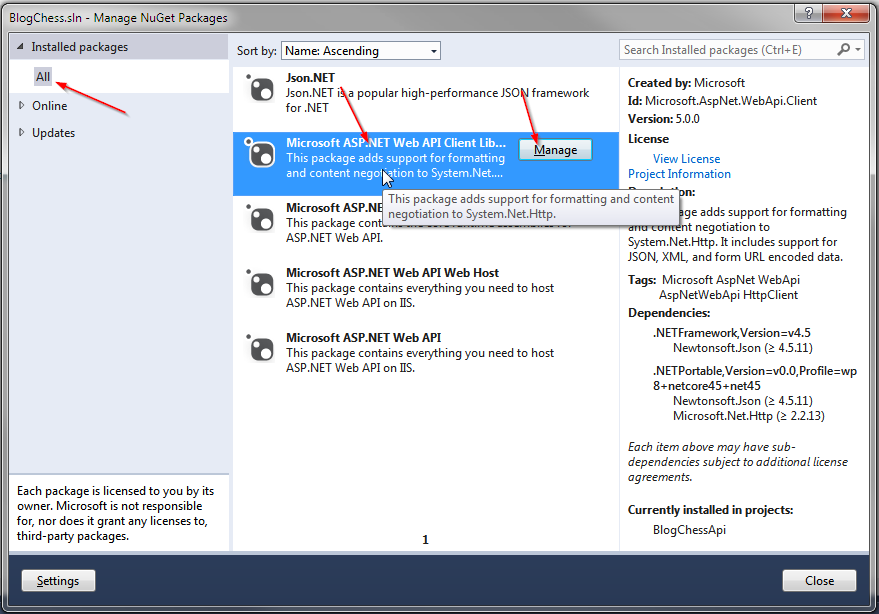
The easiest way to call our Web API Service using C# is to add the Web API Client Libraries to our project. You already have this thing installed into your solution, you just need to add it to the BlogChessApiFlexer project. Go to Tools, Library Package Manager, Manage NuGet Packages for Solution.


 Click on Installed Packages, All, Microsoft ASP.Net Web API Client Libraries, and click the Manage button.


Click the checkbox next to BlogChessApiFlexer and click the OK button.


Close the NuGet packages window. You'll also need to add a reference to BlogChess.Backend in the BlogChessApiFlexer project. Go ahead and do that, I'll wait.

Now it's time to mess with Default.aspx. We're going to keep the page pretty simple. It needs 2 buttons and 1 label, that's it. One button will postback to the server and have a server-side Click event handler. The other button we'll deal with later. The label will have the results of our tests in it, but for now it can be empty. Here is the full default.aspx file as of right now:

<%@ Page Language="C#" AutoEventWireup="true" CodeBehind="Default.aspx.cs" Inherits="BlogChessApiFlexer.Default" %>

<html xmlns="http://www.w3.org/1999/xhtml">
<head runat="server">
    Ooh, Web API Sample Clients
</head>
<body>
    <form id="form1" runat="server">
    
</form> </body> </html>


Here is the C# code-behind file, Default.aspx.cs. I'll explain it below the source code.

using System;
using System.Collections.Generic;
using System.Net.Http;
using System.Net.Http.Headers;
using BlogChess.Backend;

namespace BlogChessApiFlexer
{
    public partial class Default : System.Web.UI.Page
    {
        protected void btnServerTest_Click(object sender, EventArgs e)
        {
            //1. Create and setup client object
            HttpClient client = new HttpClient() { BaseAddress = new Uri("http://localhost:11482/") };
            client.DefaultRequestHeaders.Accept.Add(new MediaTypeWithQualityHeaderValue("application/json"));
            //2. Create a blank chess game to send up in the post request
            var game = new ChessGame() { GameStatus = GameStatus.Draw };
            var positions = new List<ChessBoard>();
            positions.Add(new ChessBoard(true));
            game.Positions = positions;
            //3. Send the request
            var response = client.PostAsJsonAsync("api/BlogChess/BestMove", game).Result;
            if (response.IsSuccessStatusCode)
            {
                //4. Read the result from the response, display the "best move"
                var bestMove = response.Content.ReadAsStringAsync().Result;
                lblResult.Text = "Success! :" + bestMove;
            }
            else //5. Request failed; tell the user what happened
                lblResult.Text = "Failzor'd!: " + response.StatusCode.ToString() + "::" + response.ReasonPhrase;
        }
    }
}


In section 1 we create an HttpClient object and assign it headers that will tell the server we expect a JSON response. This HttpClient object is what we will use to connect to the Web API Service. In section 2 we create a blank chess game that will be used as the single request parameter in the server post. Section 3 posts the request to the server; note that using the PostAsJsonAsync method will automatically convert that 2nd parameter to json for us. Section 4 assumes success, and reads the resulting "best move" from the response, displays it to the user. Section 5 assumes failure, displaying the HTTP error code and reason for failure.

Now run the website, loading up the default.aspx page. Click on the button "Server Test". You should see a result of 'Success!: "e4"'. Your C# client code has now called your server-side Web API Service. That's about it for the C# client! On to JS...


Connecting Via JavaScript Client

One easy way to connect to a Web API Service is through the use of a JavaScript library called JQuery. We'll probably get into JQuery more in a future blog post, but for now what you need to know is how to use it in your page. Modify the header of Default.aspx to look like this:


    Ooh, Web API Sample Clients


The change above is the addition of the script tag. We're just referencing the jquery library so we can use it. Now we have to add some more JavaScript in order to call the API, but you probably guessed that. Gold star for you! But no soup; the soup is mine. Here are the changes, and I'll explain the changes below the code:


Note: the above script tag goes in your header, below the script tag we added earlier for referencing JQuery. Section 1 of this new script tag is the definition of our JavaScript function bestMove(). This function will be used to call the API. Section 2 is where we setup some initial variables before making the call. Not much special, we just need an object of the proper format to send to our API method. Section 3 is where we call the API, and this is the most interesting part of the JS code. the jquery $.ajax() method is an easy way to make calls to services. As you can see, it is very easy to specify the url, type (post, get, etc), the content type (we want json!), and functions to call on success and failure. By default this function call is asynchronous, so these handlers (success function and error function) are how you will know that the call to the service is done. Section 4 is where we hook up the button click event to the function we declared above.

Now run the website, loading up default.aspx. Click the button market "Client Test". You should see the resulting string 'e4'. That wasn't too bad was it? You've now created a Web API and called it using 2 different languages. Fun stuff, highly useful, and highly portable. Gotta love Web API.


What's Next

Next week we'll have to code in some game validation and the logic for checking for victory, draw, etc. I believe that leaves us a 5th and hopefully final posting in this series for tackling the AI. Thanks for reading, and I hope you are looking forward to post #4!

Resources

  • http://www.asp.net/web-api/overview/web-api-clients/calling-a-web-api-from-a-net-client
  • http://www.codeproject.com/Articles/424461/Implementing-Consuming-ASP-NET-WEB-API-from-JQuery
  • http://www.json.org/
  • http://jquery.com/ 
  • http://api.jquery.com/jquery.ajax/